Nice to meet you. I’m Yuta.
On this blog, I’d like to share information about photography and digital cameras, as well as shooting tips.
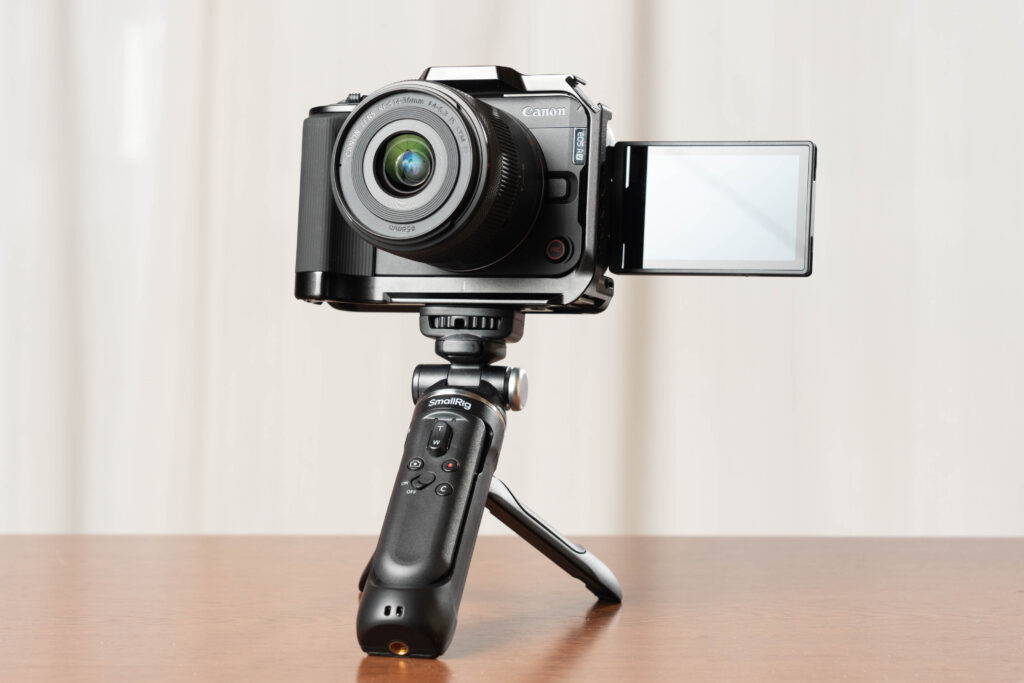
For this very first post, I’m going to write mainly about what I struggled with and thought about before deciding to buy the Canon EOS R50V, which I finally chose after a lot of 고민 (yes, I really did).
Even after I decided to buy the EOS R50V, I started wondering again: “Is this really the right choice…?”
So this article is for anyone who is having the same kind of doubts.
Yuta Decides to Buy a Camera
I thought, “Okay, I’m going to buy a camera,” around the end of 2025.
I acted quickly… but choosing which camera to buy took me a full year (well, it felt like it).
When I listed my main use cases, it was basically like this:
Use cases
- A camera for video work
- Travel
- Family photos



Budget
- Cheaper is better
- Around 100,000 yen (give or take)
Other
- Personally, I really want an EVF (electronic viewfinder)… but…
So the first model that came up as a candidate was the Canon EOS R10.
It’s affordable, and it supports an external flash.
I used to own an EOS RP a few years ago (it’s currently with my dad), so I already know Canon cameras to some extent.
Also, I like Canon’s JPEG colors.
But then I started thinking: if the price is similar, there are other options too.
Wouldn’t the Sony α6400 be fine…?
I’ve never used it, but the Tamron 17–70mm F/2.8 Di III-A VC RXD (B070) seems very practical, and it feels like one lens could cover everything I need.
But then again, I always use Sony, so maybe trying Nikon would be fun.
The Nikon Z50II could be a good option too.
The NIKKOR Z DX 24mm f/1.7 is equivalent to about 35mm, so even if I go out with just that one lens, I think I’d be very happy.
…And then I realized: Wait, I’m drifting.
I kept thinking about combinations I wanted to try, but the point was to buy a camera that actually fits my needs.
So, from the point of view of “a camera for vertical video,” I decided to buy the Canon EOS R50V, because it has features for vertical video at an affordable price.
So what was all that earlier talk?
I was basically trying hard to imagine timelines where I don’t buy the R50V.
In other words, I was thinking about reasons not to buy it.
About Cameras with Electronic Shutter Only
This time, I limited my candidates to models that have:
- a mechanical shutter, and
- a hot shoe (for flash)
There are some affordable, video-focused cameras that have electronic shutter only (like the Sony ZV-E10 II).
For video, you don’t really need a mechanical shutter, so electronic-shutter-only models can be manufactured more cheaply. That means the cost can be used for other features, so if it matches your needs, I can recommend it.
However, if you want to shoot the kinds of photography below, I strongly recommend a camera with a mechanical shutter.
Some cameras can still shoot these fine even with electronic shutter, but that’s a different world from the cameras I’m talking about here, so I’ll skip it.
Examples:
- Wild birds
- Trains
- Baseball, soccer, basketball, volleyball
- Dance, ice skating
- Basically sports in general
- Horse racing, bicycle racing
- Motorsports, etc.
If you’re interested in photographing people and want to use flash, then you should choose a camera that has a mechanical shutter and a hot shoe for external flash. You will regret it later if you don’t.
Also, the R50V’s hot shoe is special. To use third-party flashes or older Canon flashes, you need an adapter.
Personally, I wanted a camera that can shoot video but also lets me use flash when needed.
So the EOS R50V became a candidate for me, because with an adapter, I can use general-purpose flashes.
Do I Really Not Need Full Frame?
If you have money and physical strength, I think full frame is totally fine.
Actually, when the shoot is important, I use full frame pretty often.
“Full frame” refers to the image sensor size. A full-frame sensor is about the same size as 35mm film.
There are different sensor sizes, but for mirrorless cameras, it’s generally:
- Full frame
- APS-C
- Micro Four Thirds
…in that order, from larger to smaller.
Do I Need In-Body Image Stabilization?
Honestly, my feeling is: if you have it, it makes a big difference.
But for my own use, if I pay attention to shutter speed, I think I don’t need to be too scared.
- Yuta Decides to Buy a Camera
- About Cameras with Electronic Shutter Only
- Do I Really Not Need Full Frame?
- Do I Need In-Body Image Stabilization?
- Reasons Not to Buy the EOS R50V, and Reasons to Buy It
- Thinking About Why I Would Not Choose the R50V
- 1. Wouldn’t the Canon EOS R10 be more versatile?
- 2. Isn’t the Canon APS-C mirrorless lens lineup too limited?
- 3. With the R50V kit lens, you can’t shoot video with a creamy blurred background
- 4. Even though it’s marketed for video, can it really shoot high-quality video?
- 5. Canon Log 3 latitude is only up to about 800%
- 6. No 4K 120p, and 4K 60p is cropped
- 7. No viewfinder
- 8. No in-body stabilization
- 9. Compact battery type
- Thinking About Why I Would Choose the R50V
- 1. You can use Canon 709
- 2. Better heat management (apparently)
- 3. Strategic pricing (in other words: it’s cheap)
- 4. It looks cool
- Key Points
- Thinking About Why I Would Not Choose the R50V
- Conclusion
Reasons Not to Buy the EOS R50V, and Reasons to Buy It
My gear desire is getting strong, and I feel like I could buy it at any moment.
But before I run to places like here or here right now, I want to calm down and think through the reasons why I might not need to buy it.
Thinking About Why I Would Not Choose the R50V
1. Wouldn’t the Canon EOS R10 be more versatile?
Yes, exactly.
Because it has an EVF, it’s much more practical than the R50V as a “parent camera” for everyday use.
So why not choose that one?
Well… why indeed. The price… maybe?
No, that’s not it.
The main point is that this is primarily a camera for video work.
And the EOS R50V looks cool.
2. Isn’t the Canon APS-C mirrorless lens lineup too limited?
That’s true.
In Japan, Canon’s RF-S lenses are mostly Canon originals and Sigma, plus a very small number of Tamron lenses.
Compared to Sony (which has a rich APS-C lens lineup), it’s definitely fewer options.
That said, the R50V kit lens is 14–30mm and is more on the wide-angle side, which is interesting.
Also, even with RF-S lenses alone, you can cover from 10mm to 210mm, so in practice there’s almost nothing you can’t do.
3. With the R50V kit lens, you can’t shoot video with a creamy blurred background
No.
Blur (bokeh) is not created only by “using a lens with a low f-number.”
Still, the kit lens is dark (meaning the maximum aperture is relatively high), so you do need some effort and technique to get strong bokeh. That part is true.
Also, even if you use a fast lens, it won’t look the same as a full-frame or medium-format camera.
To be precise, the blur itself may be similar, but the field of view is different.
I’ll talk about that another time.
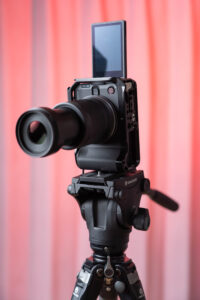
By the way, if we talk only about bokeh:
Using the SIGMA 17–40mm F1.8 DC | Art, you can get bokeh that is almost comparable to relatively high-end standard zoom lenses on full-frame cameras.
Considering you can get a camera + lens for about the price of one full-frame camera body, I think it’s a very good option.
4. Even though it’s marketed for video, can it really shoot high-quality video?
This is a nerdy topic, so if you just want to shoot normal video, feel free to skip.
If you define high quality as RAW, or at least the highest possible bitrate, or quality-first compression like All-Intra, then yes, that’s true.
Here are the video file formats the EOS R50V can record:
| Color sampling | Bit depth | Resolution | Compression | Frame rate | Bitrate |
|---|---|---|---|---|---|
| XF-HEVC SYCbCr 4:2:2 | 10-bit | 4K Crop, 4K: 3840 × 2160 | Standard LGOP | 59.94 / 50.00 (4K Crop) | 225 Mbps |
| 29.97 / 25.00 / 23.98 (4K) | 135 Mbps | ||||
| Full HD: 1920 × 1080 | 119.88 / 100.00 / 59.94 / 50.00 / 29.97 / 25.00 / 23.98 | 100 / 50 Mbps | |||
| XF-HEVC SYCbCr 4:2:0 | 4K Crop, 4K: 3840 × 2160 | 59.94 / 50.00 (4K Crop) | 150 Mbps | ||
| 29.97 / 25.00 / 23.98 (4K) | 100 Mbps | ||||
| Full HD: 1920 × 1080 | 119.88 / 100.00 / 59.94 / 50.00 / 29.97 / 25.00 / 23.98 | 70 / 35 Mbps | |||
| XF-AVC SYCbCr 4:2:2 | 4K Crop, 4K: 3840 × 2160 | 59.94 / 50.00 (4K Crop) | 250 Mbps | ||
| 29.97 / 25.00 / 23.98 (4K) | 150 Mbps | ||||
| Full HD: 1920 × 1080 | 119.88 / 100.00 / 59.94 / 50.00 / 29.97 / 25.00 / 23.98 | 100 / 50 Mbps | |||
| XF-AVC SYCbCr 4:2:0 | 8-bit | 4K Crop, 4K: 3840 × 2160 | 59.94 / 50.00 (4K Crop) | 150 Mbps | |
| 29.97 / 25.00 / 23.98 (4K) | 100 Mbps | ||||
| Full HD: 1920 × 1080 | 119.88 / 100.00 / 59.94 / 50.00 / 29.97 / 25.00 / 23.98 | 70 / 35 Mbps |
Source: Canon
From this table, we can see that if you shoot in 4K 23.98p / 25p / 29.97p with YCbCr 4:2:2, 10-bit, you can record at:
- 135 Mbps in XF-HEVC S, and
- 150 Mbps in XF-AVC S.
XF-HEVC S has a higher compression ratio, so the bitrate is lower.
Sure, there are many competing cameras in the same price range that can record at higher bitrates.
Also, the fact that compression is LGOP only means that compared to cameras that can shoot All-Intra, you could say it “can’t shoot high quality,” even more than just the bitrate numbers.
However, because it supports 4:2:2 and 10-bit, it is at a level that until recently you typically needed more professional cameras to handle properly in editing tools like DaVinci Resolve Studio or Premiere Pro.
In reality, for the way most people watch videos today, if you just play back footage straight from the camera with no editing, the camera is already a bit over-spec for our viewing environment.
So if you want more than this, you probably need to buy more serious gear.
5. Canon Log 3 latitude is only up to about 800%
With the EOS R50V, the latitude of Canon Log 3 is about 800% at ISO 400.
If you focus on that, you might think, “Isn’t it hard to use…?”
I think so too.
But if you care that much, you should probably buy a mid-range or higher camera.
For reference, other models:
- EOS R1 (released in 202X): about 1600% at ISO 800+
- EOS R3 (2021): about 1600% at ISO 800+
- EOS R5 (2020): about 1600% at ISO 800+
- EOS R5C (2022):
- EOS R5 II (released in 202X): about 1600% at ISO 800+
- EOS R6 (released Aug 27, 2020): about 1600% at ISO 800+
- EOS R6 II (2022): about 1600% at ISO 800+
- EOS R6 III (2025):
- EOS R7 (released Jun 23, 2022): about 1600% at ISO 800+
- EOS R8 (2023): about 1600% at ISO 800+
I won’t talk about Canon Log (1) or Canon Log 2, because this camera doesn’t have them.
Personally, I think Canon Log 2 is great for careful grading, but it doesn’t match the design philosophy of the EOS R50V.
6. No 4K 120p, and 4K 60p is cropped
I think this is simply a limitation of the sensor, processing unit, and the body.
If you need these features, you should look at a different camera.
On the other hand, the EOS R50V’s character is that even without a fan, it can still shoot video for a reasonable amount of time.
In other words, it’s about what you choose, and what you accept not having.
Also, if you understand what kinds of expressions require 4K 120p, you’ll avoid regret later.
For example, if you want to express “cherry blossom leaves falling” in slow motion, you can do it at 60p, but 120p might look more impressive.
It’s not about which is “better.” It’s simply a difference in expression and preference.
If you believe you can’t create the expression you want without 4K 120p, then you should choose a camera that has it.
7. No viewfinder
If you think of it as a photography camera, I personally think a viewfinder is absolutely necessary.
But the purpose of buying this camera is video work, so considering the price, this is a compromise.
(That said, even for video, a viewfinder can help. But this camera isn’t really designed for the kind of use where you fine-tune composition through a viewfinder.)
8. No in-body stabilization
There is no in-body stabilization.
But if the camera can record video for a decent time without a fan, I think that trade-off is understandable.
Again, it’s about what you choose and what you don’t.
9. Compact battery type
As of January 2026, the Sony ZV-E10 II (which is probably a competitor) uses the same battery as higher-end models, so it lasts surprisingly long for an entry-level camera.
Honestly, I’m jealous of that.
Thinking About Why I Would Choose the R50V
The EOS R50V is positioned as an entry-level camera that can shoot both photos and video.
Compared to full-frame cameras or mid-range APS-C cameras, there are things you have to compromise on, and there are many points that make you feel “I wish it had that…”
However… despite being in a relatively affordable price range (113,000 yen for body only, and 140,800 yen for the lens kit as of January 2026), it also has advantages that don’t feel inferior to mid-range cameras.
Here are the points I personally think are strong (or at least promising):
1. You can use Canon 709
The EOS R50V is in the lower-priced Canon category.
But because it’s positioned as a video-oriented camera, it often offers more video-related settings than models designed mainly for photography.
The EOS R50V has three color modes:
- Picture Style
- Color Filter
- Custom Picture
It even has a dedicated “Color” button on the body. That’s pretty serious.
Most importantly, it supports setting Custom Picture, which is one of the best things about this camera for image creation.
Extra note: Because you need both hands to operate some settings, if you’re using Canon for the first time, the controls might feel confusing. It took me a few days to get used to it.
Picture Style is the familiar Canon feature. For still photos, I use Faithful most of the time.
Color Filter is like the filters that have existed on digital cameras forever, but many of them are modern and stylish. For quick everyday shooting and uploading to social media, it might be perfect. You can use it for photos too.
By the way, Sony’s “Creative Look” is really great. I use FL, IN, and SH a lot.
For Canon’s filters, I’m really curious about RetroGreen. I want to try it and write about it later.
Custom Picture is mainly for video. It includes many technical terms, and it’s not an easy feature for the average consumer.
You can also use Canon Log 3, which many YouTubers recommend. The camera also supports gamma options like HLG and PQ.
Even though I just said it’s hard to master, I feel that the biggest strength is being able to use Canon 709 via Custom Picture.
Canon 709 is designed as Canon’s idea of a cinema look, featuring film-like tones and soft skin tones. It requires no color grading, and it can record footage close to the final look you get when using Canon Log within the CINEMA EOS SYSTEM.
Source: Canon “Technical Explanation ② | About 709 Display Mode”
In other words, it is a preset that helps you create a cinematic look focused on skin tones, while reducing the burden of color grading.
It is not “accurate” to the colors you see with your eyes.
It’s more like Canon is saying, “This is the kind of image you want to see, right?”
If I had the time and patience to do a slow workflow like:
shoot → color correction → color grading…
then maybe I could do it differently.
But I don’t have that kind of time or patience.
I want to deliver what people need as quickly as possible. A function like this helps make the workflow closer to “just cut and connect the clips and you’re basically done.”
Also, Custom Picture allows very detailed control like gamma curves, color space selection, matrix settings, black adjustment, and more.
That makes it possible to approach a production flow closer to “cut, connect, and done.”
Sony cameras also have a function called “Picture Profile,” with S-Cinetone as a color profile.
The target look is totally different, but it’s also a beautiful image design that focuses on skin tones.
I think S-Cinetone is really beautiful.
But I also felt that it’s a color that makes viewers pay attention to the image itself, sometimes more than the content.
Canon 709 also values beautiful skin tones, but I feel it helps the viewer focus more on the subject’s inner side (the person), not just the image.
That was one of the big reasons I chose Canon instead of Sony for a video-focused camera this time.
For still photo RAW development, I use Adobe Lightroom Classic, and quite often I start by applying a preset.
I could shoot Canon Log 3, or bake in a LUT I made.
But Log shooting adds more steps later, and I don’t have the ability to create a skin-tone-focused LUT without breaking the overall image.
So for now, I want to keep using Canon 709.
2. Better heat management (apparently)
I usually shoot with Sony mirrorless cameras.
My impression is that Sony’s lower-priced cameras sometimes stop due to heat during video.
So I have a small expectation: how long will the EOS R50V keep running?
If it can do something like 5–6 minutes of 4K30p recording repeatedly until the battery dies, I’d be very happy.
3. Strategic pricing (in other words: it’s cheap)
Whether it’s “cheap” or not depends on whether you can really use it a lot.
If you buy it thinking it’s mainly for still photography, it will probably feel “expensive.”
With only the LCD screen, I think shooting something like a sports day event under bright sunlight would be difficult.
Even more than the lack of in-body stabilization, the lack of a viewfinder makes telephoto lenses especially a bad match.
But if you think of it as a camera to put on a tripod and “record,” it’s a very capable camera.
The body is compact and light.
If the camera is light, you can choose a lighter tripod too.
Portability is a very important factor.
When you start doing video, you often spend budget and physical space on accessories more than the camera body or lenses.
So if the camera body is small, you can also keep your accessories smaller and cheaper.
That is a big advantage too.
But that’s not the main point.
4. It looks cool
What matters is whether it feels good to use.
The design of this camera is excellent.
Entry-level cameras often lack physical buttons, or have certain limitations, and there are endless complaints you could make.
But more importantly, for me, it matters that it’s a camera you can keep on a strap at all times, and that you can take out of your bag anytime.
Key Points
Reasons not to buy the EOS R50V
- No EVF: Not ideal for people who often use a viewfinder for photography.
- No in-body stabilization: A disadvantage if you shoot lots of handheld video.
- No 4K 120p / 4K60p is cropped: If you care about slow motion or wide angles, consider other cameras.
- Small battery: Be careful if you need long shooting times or heavy spare-battery operation.
- RF-S lens lineup: APS-C lenses are still developing. Check if you need special focal lengths.
- Lower latitude than higher-end cameras: If you value serious grading and dynamic range for pro work, it may feel limited.
Reasons to buy the EOS R50V
- Designed for easy video creation, especially vertical video: Strong video-oriented features.
- Canon 709 (Custom Picture): Makes it easier to get a cinematic look straight out of camera, with less editing burden. Great for skin tones.
- Expected heat performance: Compared to heat shutdown issues seen in some low-priced Sony cameras, it may be more stable for longer recording (needs real-world confirmation).
- Price and portability: Affordable, light, compact. You can keep accessories smaller too.
- Design: The look and portability can be an important part of the experience.
Conclusion
The EOS R50V is a great choice for people who want to start shooting video (especially vertical video) in an easy way.
On the other hand, if you mainly care about photography, high frame rates, or serious Log workflows, other options may be a better fit.
The right answer depends on your use case, and whether you can accept the compromises.
Choosing a camera is stressful, right?
Some people love buying gear as a hobby, but that’s only a small group (although they stand out online).
If you want a camera for travel, family, theme parks, zoos, sports, portraits, or as a work tool… this camera will not be perfect for everyone.
The EOS R50V is not a camera that fits everyone.
If you prioritize photography, the absolute highest codec quality, or serious Log shooting, you should consider other choices too.
But the EOS R50V is affordable compared to what videographers often use, and it is compact, portable, and stylish.
So for people who want to start shooting video, people who want a camera they can use casually, or people who want a video-oriented camera that can also shoot photos… I strongly recommend taking a look.
As you can see from the photos I posted, after a lot of 고민, I bought the double zoom kit.
I’m going to use it a lot.
Buying a camera is fun, but shooting is even more fun.
Let’s enjoy filming.